
Introduction
Your Google Ads campaign may be generating clicks, but clicks alone do not grow a business. If visitors are not calling, submitting forms, booking, or buying, your campaign may be spending money without producing meaningful results.
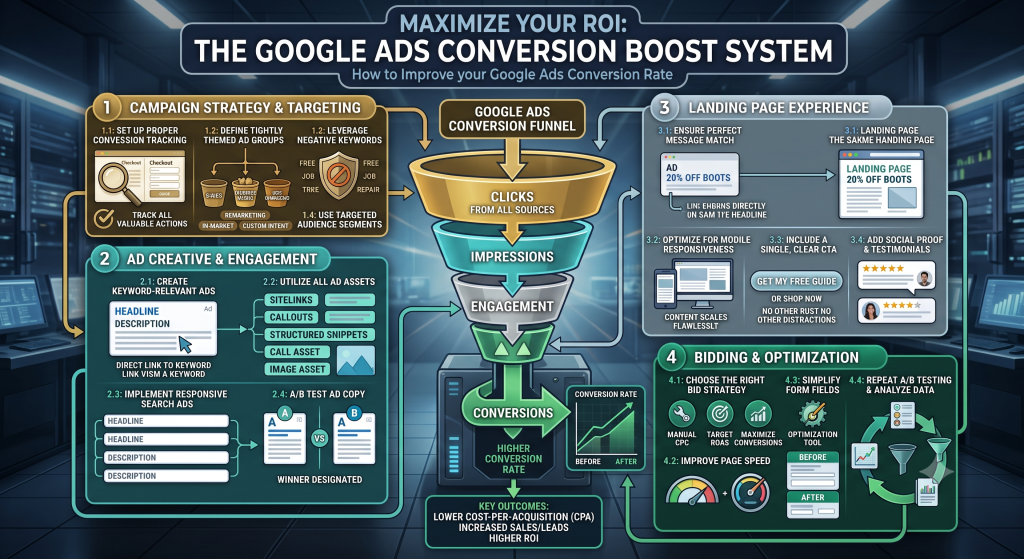
Improving conversion rates is rarely about changing one setting. It usually requires improving the entire journey: Search to Ad to Click to Landing Page to Offer to CTA to Conversion. A weak link anywhere in that chain can reduce results, even if everything else is working well.
This guide walks through a practical framework for diagnosing conversion problems, improving traffic quality, strengthening ad relevance, optimizing landing pages, and testing improvements systematically. It focuses on what genuinely helps the right visitor take meaningful action, not on shortcuts or promises.
What Is Google Ads Conversion Rate?
Google Ads conversion rate is the percentage of ad interactions or visits that result in a desired action, such as a lead, phone call, purchase, booking, or form submission.
The basic formula is: Conversion Rate = (Conversions / Relevant Interactions) x 100. The exact calculation can vary depending on campaign settings and how conversions are defined in your account.
Conversion rate should never be read in isolation. A high rate can still hide a bad campaign if the conversions are low quality or unprofitable. Consider it alongside:
- Cost per conversion – how much you pay for each result
- Conversion value – what each conversion is worth to your business
- Return on ad spend – revenue relative to ad spend, where applicable
- Lead quality – whether leads turn into customers
- Revenue – the actual business outcome, not just the number of leads
A campaign with a modest conversion rate but high lead quality and strong revenue is usually more valuable than one with a high rate and no paying customers.
Why Are Your Google Ads Getting Clicks but Not Conversions?
Clicks without conversions usually mean something in the journey from search to action is broken. The problem may start before the visitor reaches your landing page.
Common causes include:
- Wrong audience. Your ads may be reaching people who are not in a position to buy or are outside your service area.
- Poor keyword intent. You may be bidding on research-stage keywords that rarely produce buyers.
- Weak ad-to-landing-page relevance. If the ad promises one thing and the page delivers another, visitors leave.
- Slow landing pages. Visitors abandon pages that take too long to load, especially on mobile.
- Unclear CTA. If visitors do not know what to do next, they usually do nothing.
- Weak offer. No amount of optimization can fix an offer nobody wants.
- Poor trust signals. Visitors hesitate when they cannot verify who they are dealing with.
- Complex forms. Long or confusing forms create friction at the last step.
- Incorrect conversion tracking. If tracking is broken, you may be optimizing based on incomplete or misleading data.
Step 1: Make Sure You Are Tracking the Right Conversions
Optimization without reliable measurement is guesswork. Before changing anything, confirm that your conversion tracking reflects real business actions.
Different types of conversions to consider:
- Purchases (e-commerce)
- Form submissions
- Phone calls from ads or the website
- Bookings and appointments
- Quote requests
- Demo requests
- Qualified leads, where you can track them back to the source
It helps to separate primary business conversions (the actions that directly drive revenue) from secondary engagement actions (newsletter signups, downloads, or page views that indicate interest but are not purchases).
Not every click, page view, or button interaction should be treated as a primary conversion. Define conversions based on meaningful business goals, and validate that they fire correctly before drawing conclusions from the data.
Step 2: Improve Keyword Targeting and Search Intent Alignment
Traffic quality matters more than traffic volume. A keyword that brings 500 visits and no customers is worth less than one that brings 30 visits and 5 qualified leads.
Understanding intent behind searches:
High Intent
Searchers who are actively looking for a product or service. These often include words like “near me,” “hire,” “buy,” “book,” or specific product names.
Research Intent
Searchers who are still learning. Words like “what is,” “how to,” or “best way to” usually signal this stage. These visitors may convert later but rarely convert on the first visit.
Low Relevance
Searches from people who are unlikely to become customers. This might include job seekers, students, or people outside your service area.
Review your search terms report regularly. Identify which queries produce conversions and which consume budget without results. Match types matter here too, since broad match reaches further but often brings in less relevant traffic.
Example: A plumber bidding on “plumbing” may get clicks from people researching how plumbing works. Bidding on “emergency plumber near me” attracts people who need help right now and are far more likely to call.
Step 3: Use Negative Keywords to Reduce Wasted Traffic
Negative keywords prevent your ads from showing for searches you do not want. They are one of the simplest ways to reduce wasted spend and improve conversion rate, because they filter out traffic that was never going to convert.
A practical process:
- Review your search terms report
- Identify irrelevant themes (job seekers, free seekers, unrelated topics)
- Confirm they are genuinely irrelevant to your business
- Add negative keywords carefully, at the appropriate level
- Monitor results over the next few weeks
Important: Do not add negative keywords blindly. Overly aggressive lists can block valuable searches and reduce your reach. Add them based on real data, not assumptions.
Step 4: Improve Ad Relevance
Ad relevance is about alignment. The visitor should see a clear connection between what they searched for, the ad they clicked, and the page they land on.
The chain looks like this: Search Query -> Keyword Theme -> Ad Copy -> Landing Page. A mismatch anywhere in that chain reduces the likelihood of conversion.
Relevant ads usually include:
- Headlines that reflect what the searcher typed
- Descriptions that explain the specific benefit
- A clear offer or next step
- Language that matches the searcher’s intent
An ad should accurately represent what the visitor will find after clicking. Misleading clickbait may get more clicks, but it rarely produces meaningful conversions.
Step 5: Write Ad Copy That Attracts the Right Clicks
The goal of ad copy is not simply to maximize clicks. It is to attract qualified visitors who are likely to convert.
Elements of effective ad copy:
- Clear value proposition
- Specific benefits rather than vague claims
- Relevant features that matter to the buyer
- Problem-solving language that mirrors the searcher’s concern
- Appropriate calls to action
- Clarity about the offer
Comparison example: A vague ad might say “We offer quality services you can trust. Contact us today.” A specific ad for the same business might say “Emergency Plumber in Austin. 24/7 Response. Get a Fixed Quote in 15 Minutes.” The second attracts people who are actually in need and ready to act, which usually means fewer clicks and more conversions.
Step 6: Match Your Landing Page to the Ad
The landing page should continue the conversation the ad started. If the ad promises a free quote, the page should offer a free quote. If the ad mentions a specific service, the page should be about that service.
Message match means aligning:
- Search intent
- Ad headline
- Landing page headline
- Offer details
- Call to action
- Supporting information
Sending visitors to a generic homepage is sometimes appropriate, but it often dilutes relevance. A dedicated landing page focused on a single offer usually performs better because it removes distractions and matches the visitor’s expectation. The right choice depends on your campaign, your offer, and your audience.
Step 7: Improve Your Landing Page Experience
Clear Headline
The visitor should understand the offer within seconds. If the headline is vague, they will leave.
Strong Value Proposition
Explain why the offer matters. What problem does it solve? What benefit does it deliver?
Relevant Information
Answer the questions visitors are likely to have before they commit. Pricing, process, timeline, and what happens after they submit.
Clear CTA
Tell the visitor exactly what to do next. One primary CTA per page usually works better than several competing options.
Trust Signals
Genuine reviews, credentials, policies, and relevant proof reduce hesitation. Do not fabricate testimonials, badges, or results.
Reduced Distractions
Remove unnecessary navigation or competing actions where appropriate. Every element should support the primary goal.
Mobile-Friendly Design
Ensure the page works well on smaller screens. A large share of clicks often come from mobile devices.
Step 8: Improve Landing Page Speed
Slow pages create friction. Visitors abandon sites that take too long to load, especially on mobile connections. Speed is one component of the overall conversion experience, not the only one.
Areas worth reviewing:
- Compress and properly size images
- Remove unnecessary scripts and plugins
- Check mobile performance separately from desktop
- Review hosting quality and server response time
- Use browser caching and content delivery where appropriate
No exact percentage of conversion improvement can be guaranteed from speed changes alone. What matters is removing anything that makes the visitor wait unnecessarily.
Step 9: Make Your Call to Action Clear and Relevant
Vague CTAs create hesitation. Generic labels like “Submit” or “Click Here” do not tell the visitor what happens next or why they should take the action.
Action-oriented alternatives:
- Get a Free Quote
- Book a Consultation
- Request Pricing
- Start Your Order
- Schedule a Demo
- Speak to a Specialist
The CTA should match the user’s intent, the stage of their journey, and the offer itself. A visitor ready to buy does not need the same CTA as someone still researching. Never use manipulative or deceptive language.
Step 10: Improve Your Offer
Even a well-optimized campaign will struggle if the offer is not compelling. The offer is what the visitor gets in exchange for their attention, time, or money.
Possible offer elements to test:
- Clear value and specific outcome
- Competitive positioning relative to alternatives
- Convenience (quick, easy, no obligation)
- Relevant incentives where appropriate
- Free consultation, demo, or trial
- Bundles or packages
Test offers based on your business model and audience. Avoid false urgency or misleading scarcity. Honest, specific offers tend to produce better long-term results.
Step 11: Simplify Your Forms
Long or complicated forms create friction. Each additional field is a small obstacle, and small obstacles add up.
Form improvement areas:
- Ask only for information you actually need
- Use clear, simple labels
- Ensure the form works well on mobile
- Show helpful error messages when something is missing
- Reassure visitors about privacy
- Order fields logically
The ideal number of fields depends on your lead quality requirements, sales process, offer value, and industry. Fewer fields do not always produce better business results, especially if they bring in unqualified leads that waste sales time.
Step 12: Build Trust Before Asking for the Conversion
Visitors hesitate when they are not sure who they are dealing with. Trust signals reduce that hesitation and make it easier to take the next step.
Trust elements that help:
- Clear contact information including phone, email, and address
- Genuine testimonials from real customers
- Verified credentials or certifications where applicable
- Transparent pricing or a clear explanation of how pricing works
- Privacy information and clear policies
- Case studies based on real information
Never use: fake testimonials, fake reviews, fake customer logos, fake trust badges, or fabricated statistics. These tactics damage trust when discovered and may violate advertising policies.
Step 13: Improve Audience Targeting
Audience quality affects conversions. Even with perfect ad copy and a great landing page, the wrong audience will not convert.
Targeting options to review:
- Location targeting to focus on areas you actually serve
- Demographic settings where relevant to your offer
- Audience signals that align with your best customers
- Remarketing audiences for people who have already engaged
- Customer segments based on historical data
Not every targeting option suits every campaign. Base decisions on your business goals, available data, customer behavior, and campaign type. Over-restricting can shrink reach below what is useful, and under-restricting can waste budget on the wrong people.
Step 14: Use Remarketing Strategically
Remarketing shows ads to people who have already interacted with your business. It is not a guaranteed conversion driver, but it can be useful in certain situations.
Situations where remarketing may help:
- Visitors who viewed important pages but did not convert
- Visitors who started a form or checkout but did not finish
- Previous customers, where appropriate and respectful
- Users who engaged with specific content
Things to manage carefully:
- Relevant messaging that acknowledges where they are in the journey
- Frequency management to avoid overwhelming the same people
- Privacy compliance and advertising policies
- Avoiding overly repetitive advertising that irritates visitors
Step 15: Optimize for Mobile Users
Mobile visitors behave differently from desktop users. They may be on the move, using a smaller screen, and less patient with friction. A page that works well on desktop can still fail on mobile.
Mobile-specific areas to review:
- Page loading speed on mobile connections
- Form usability on small screens
- Button size and tap targets
- Text readability without zooming
- Click-to-call functionality where relevant
- Navigation and menu usability
- Checkout experience for e-commerce
Analyze mobile performance separately from desktop in your reports. Improvements that help desktop do not always help mobile, and vice versa.
Step 16: Review Device, Location, and Time Performance
Segmentation can reveal opportunities that are hidden when you only look at overall numbers. Breaking performance down by segments often shows patterns worth acting on.
Segments worth reviewing:
- Device (mobile, desktop, tablet)
- Geographic location
- Day of the week
- Time of day
- Audience segment
- Campaign, ad group, or keyword group
Look for meaningful patterns before making major changes. A small number of conversions in one segment is usually not enough data to draw firm conclusions. Wait for reliable sample sizes where practical.
Step 17: Improve Your Quality and Relevance Signals
Google Ads uses a set of relevance metrics that influence your advertising experience. These include expected click-through performance, ad relevance, and landing page experience.
Improving relevance can support a better advertising experience, but it is difficult to predict exactly how these signals affect cost or position. Do not treat any single metric as a lever you can pull with predictable results.
Practical ways to improve relevance:
- Group related keywords tightly in ad groups
- Write ad copy that directly reflects the keyword theme
- Send traffic to pages that match the ad promise
- Keep landing pages fast and easy to use
- Review search terms and refine targeting
Step 18: Test One Meaningful Change at a Time
If you change five things at once and results improve, you will not know which change helped. If results get worse, you will not know which change hurt. Test one meaningful change at a time where practical.
Elements worth testing:
- Headlines and ad copy variations
- Offers and incentives
- Call to action wording
- Landing page layouts
- Form length and field order
- Audience targeting
- Ad messaging themes
The testing cycle: Hypothesis -> Test -> Measure -> Learn -> Improve. Allow enough data to accumulate before drawing conclusions. A few conversions in one variation is rarely enough to make a confident decision.
Step 19: Analyze Conversion Quality, Not Just Conversion Quantity
Not every conversion is equal. A hundred unqualified form submissions can be less valuable than ten well-qualified leads that turn into customers.
Ways to evaluate conversion quality:
- Lead quality as assessed by your sales team
- Sales-qualified leads (SQLs) versus total leads
- Revenue generated per campaign
- Customer lifetime value where relevant
- Repeat customers and referrals from each source
A campaign with fewer but higher-quality conversions often produces better business results than one generating many low-quality leads that drain sales time.
Step 20: Improve the Entire Conversion Journey
Conversion optimization should consider every stage, not just the landing page. The full journey looks like this:
Search Intent -> Keyword -> Ad -> Click -> Landing Page -> Trust -> CTA -> Conversion -> Follow-Up
Possible friction points at each stage:
- Search Intent: Keyword does not match what the searcher actually wants
- Ad: Copy is vague, misleading, or does not reflect the landing page
- Click: Traffic comes from locations or devices you do not serve well
- Landing Page: Slow, cluttered, or mismatched with the ad
- Trust: No clear information about who you are or why you are credible
- CTA: Unclear, hidden, or not aligned with intent
- Conversion: Forms are long, complicated, or ask for too much
- Follow-Up: Slow response time or unclear next steps after the lead comes in
Common Google Ads Conversion Rate Problems and How to Fix Them
| Problem | Possible Causes | Areas to Investigate |
|---|---|---|
| High clicks, low conversions | Wrong audience, weak offer, mismatched landing page | Search intent, ad-to-page relevance, landing page clarity |
| Good volume, poor lead quality | Keywords attracting research-stage users, offer too broad | Keyword list, negative keywords, audience targeting, form fields |
| High cost per conversion | Competitive auction, weak relevance, low conversion rate | Ad relevance, landing page experience, bidding strategy, budget allocation |
| Mobile traffic does not convert | Slow mobile pages, small tap targets, hard-to-use forms | Mobile page speed, form usability, button size, readability |
| Visitors leave quickly | Slow loading, unclear headline, mismatched expectation | Page speed, above-the-fold content, message match |
| Conversion tracking looks incorrect | Broken tags, duplicate conversions, misconfigured goals | Validate tracking setup, test conversions manually, review goal definitions |
A Practical Google Ads Conversion Rate Optimization Checklist
Tracking
- Are important business actions being tracked?
- Is tracking functioning correctly on all devices?
Keywords
- Do keywords match user intent?
- Are irrelevant searches being reviewed and excluded?
Ads
- Does the ad accurately describe the landing page?
- Does the copy attract qualified visitors, not just clicks?
Landing Pages
- Is the page relevant to the ad?
- Is the offer clear within the first few seconds?
- Is the CTA obvious and specific?
- Is the page easy to use on all devices?
Trust
- Are trust signals genuine and verifiable?
- Is important business information easy to find?
Mobile
- Does the page work properly on mobile?
- Are forms easy to complete on a phone?
Testing
- Is there a clear testing process?
- Are changes being measured before new ones are made?
Business Results
- Are leads becoming customers?
- Is conversion quality being measured, not just volume?
How AI Can Help Improve Google Ads Conversion Rates
AI tools can support various parts of Google Ads optimization, but they are assistants, not replacements for judgment.
Areas where AI can help:
- Keyword research and clustering
- Search intent analysis at scale
- Ad copy ideation and variation generation
- Landing page content review
- Customer research synthesis
- Data interpretation and pattern spotting
- Testing idea generation
- Content drafting support
Important principle: AI can help improve efficiency, but it should not replace human judgment, customer understanding, accurate measurement, or compliance with advertising policies. AI does not automatically improve conversion rates. It supports the humans doing the work.
AEO: How to Structure Google Ads Content for Answer Engines
Answer Engine Optimization (AEO) makes content easier for search engines, voice assistants, and AI systems to extract and present as a direct answer. This applies to help content, landing pages, and FAQ sections supporting your Google Ads campaigns.
For important questions, use this structure: Question -> Direct Answer -> Explanation -> Practical Action.
Techniques that support AEO:
- Use question-based headings that match real queries
- Answer each question in a short, clear paragraph
- Include concise definitions for technical terms
- Use numbered steps for processes
- Add comparison tables where multiple options exist
- Include FAQ sections on relevant pages
GEO: How to Make Google Ads Content Useful for Generative AI Search
Generative Engine Optimization (GEO) focuses on making content easy for generative AI systems to understand, summarize, and reference. The same principles that help human readers also help AI systems interpret your content correctly.
What supports GEO:
- Clear definitions of key concepts
- Specific explanations rather than vague claims
- Logical relationships between ideas explained plainly
- Accurate terminology consistent across the page
- Practical context for every recommendation
- Well-organized headings that reflect the content structure
A useful relationship to remember: better intent alignment -> more relevant traffic -> greater likelihood of meaningful conversions. Following these principles does not guarantee visibility in AI-generated answers, but it improves the conditions for being understood.
How to Measure Whether Your Conversion Rate Improvements Are Working
Evaluate changes carefully and account for factors that can distort results.
Metrics worth reviewing:
- Conversion rate
- Conversion volume
- Cost per conversion
- Conversion value where relevant
- Lead quality as assessed by sales
- Revenue attributable to campaigns
- Return on ad spend where relevant
Factors that can affect the comparison:
- Seasonality (demand changes across the year)
- Traffic changes unrelated to your optimizations
- Budget changes affecting reach
- Campaign structure changes affecting distribution
- Small sample sizes that make results unreliable
No single metric tells the full story. Use several together and interpret them in the context of your business goals.
Final Thoughts
Improving your Google Ads conversion rate is not about finding one secret setting. It requires improving the whole chain: traffic quality, intent alignment, ad relevance, landing page experience, offer, trust, CTA, measurement, and testing.
The underlying principle is simple. Better conversions usually come from making it easier for the right person to take the right action at the right moment. Everything else is in service of that.
Work through the steps systematically, test one change at a time, and pay attention to what the data actually tells you. No approach guarantees specific conversion rates or business results, but consistent, focused improvement tends to compound over time.
Key Takeaways
- Google Ads conversion rate measures the percentage of ad interactions that result in a desired action, such as a lead, call, or purchase.
- Conversion rate should always be evaluated alongside cost per conversion, lead quality, and revenue, not in isolation.
- Clicks without conversions usually mean something in the journey from search to action is broken.
- Reliable tracking must come first. Without accurate measurement, optimization is guesswork.
- Search intent matters more than keyword volume. A keyword that brings qualified visitors outperforms one that brings many.
- Ad-to-landing-page relevance is critical. The page should continue the conversation the ad started.
- Landing page experience includes headline clarity, speed, trust signals, CTA, and mobile usability.
- Test one meaningful change at a time so you can identify what actually helped or hurt.
- Conversion quality matters more than conversion quantity. Fewer good leads often beat many poor ones.
- Improving conversion rate is a continuous process of improving the full journey, not finding one secret setting.
Frequently Asked Questions
A good conversion rate depends heavily on your industry, offer, traffic source, and business model. A rate that is excellent for one type of business may be poor for another. Rather than chasing a benchmark, compare your own campaigns over time and against realistic expectations for your industry.
Clicks without conversions usually point to a mismatch somewhere in the journey. Common causes include wrong audience targeting, poor keyword intent, weak ad-to-landing-page relevance, slow pages, unclear CTAs, weak offers, missing trust signals, complex forms, or broken conversion tracking.
Start by ensuring tracking is accurate. Then review keyword intent, add negative keywords where relevant, improve ad relevance, align landing pages with ads, strengthen the offer, simplify forms, add trust signals, and test one change at a time. No single change guarantees results, but consistent improvement tends to compound.
Yes, slow pages create friction and visitors often leave before the page finishes loading. However, no exact percentage improvement can be guaranteed from speed changes alone. Speed is one component of the overall experience, alongside relevance, clarity, and trust.
Conversion tracking is essential. Without reliable measurement, you cannot tell what is working or where to focus. Validate that tracking fires correctly on all devices and reflects the actions that actually matter to your business.
Negative keywords can help by preventing ads from showing for searches that are unlikely to convert. This reduces wasted spend and can improve overall conversion rate. However, overly aggressive negative lists can block valuable traffic, so base them on real search term data rather than assumptions.
Focus on higher-intent keywords, refine audience targeting, add qualifying questions to forms where appropriate, and review which campaigns produce leads that actually convert into customers. Also consider the message on your landing page and whether it attracts the right kind of visitor.
Quality usually matters more than quantity. A hundred unqualified leads can be less valuable than ten well-qualified ones that turn into customers. Track conversion quality alongside volume, and be willing to trade a lower conversion rate for higher overall revenue.
Review performance regularly, but avoid making constant changes. Give tests enough time to gather meaningful data before drawing conclusions. Weekly reviews for monitoring and monthly or quarterly deep reviews for structural changes tends to be a reasonable rhythm for many accounts.
AI tools can assist with keyword research, ad copy ideation, data interpretation, and testing ideas. They should support, not replace, human judgment, customer understanding, accurate measurement, and compliance with advertising policies. AI does not automatically improve conversion rates.
Mobile visitors behave differently. They may be on the move, less patient, and using a smaller screen. If your page is slow, hard to navigate, or has small tap targets, mobile users will leave more quickly than desktop visitors. Analyze mobile performance separately and improve it based on what you find.
Cost per conversion can be reduced by improving relevance between keywords, ads, and landing pages, refining targeting, eliminating wasted search terms, improving conversion rate, and reviewing bidding strategies. There is no guaranteed reduction, but better relevance and higher conversion rates usually help efficiency.
Need Help Improving Your Google Ads Conversion Rate?
If your Google Ads campaigns are spending budget but not producing the leads, calls, or sales you expect, the problem is often found in the details: intent alignment, ad-to-page relevance, or the experience on your landing page. OptiRanker works with businesses on Google Ads strategy, conversion rate optimization, and landing page improvements.
We focus on practical improvements that help the right visitors take meaningful action without empty promises or shortcuts.